

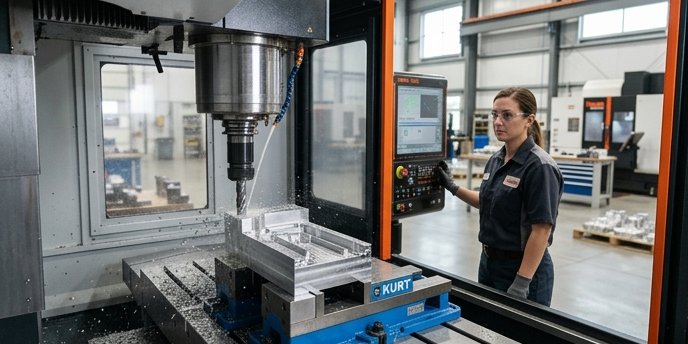
CNC milling is a subtractive process. A computer-controlled rotating cutter removes material from a stationary workpiece until what’s left is the part you wanted. The workflow goes CAD design → CAM toolpath → G-code → machine execution. A 3-axis mill handles most prismatic parts; complex geometry needs 4- or 5-axis machines.
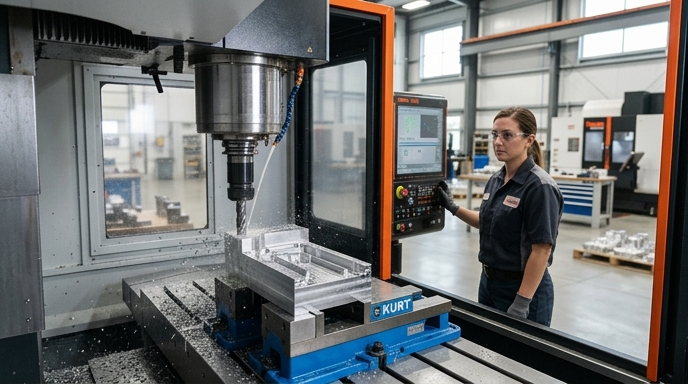
The CNC Milling Workflow in Six Stages (From Idea to Part)
Six stages: design (CAD), programming (CAM), code generation (G-code), machine setup, machining, and inspection. Beginners assume the machine does the heavy lifting. The physical cutting is usually the shortest phase of a prototype run.
- CAD (Computer-Aided Design): You create a 3D model of the part.
- CAM (Computer-Aided Manufacturing): You define how the cutting tools will move to create that shape.
- G-Code Generation: The CAM software translates those movements into text-based coordinates.
- Setup: The operator bolts a vise to the machine table, loads the raw aluminum block, measures the tools, and tells the machine where the block is located in physical space.
- Machining: The machine executes the G-code.
- Inspection: Calipers or a Coordinate Measuring Machine (CMM) verify the final dimensions.
For a simple aluminum bracket, the physical machining might take 10 minutes. Programming the CAM and setting up the machine frequently takes two to three hours. Setup time is what dictates your prototype pricing, not cycle time.
What’s Actually Inside a CNC Mill (Anatomy That Matters)
A CNC mill is a heavy cast-iron frame built to resist vibration. The primary components dictate what the machine can cut and how fast.
The spindle holds and rotates the cutting tool. Spindle speeds vary wildly by machine class. A Haas Mini Mill, a standard entry-level industrial machine, has a 7.5 horsepower spindle that spins at 6,000 RPM. A desktop router might spin at 30,000 RPM, but it lacks the torque to push a large cutter through steel.
The axes (X, Y, and Z) move the workpiece or the spindle. Industrial machines use heavy linear guide rails and ball screws to move these axes with zero backlash.
The tool changer (ATC) automatically swaps cutters mid-job. Machines without an ATC require the operator to manually loosen the collet, swap the tool, and remeasure the tool height for every single operation. On a part with eight tool changes that adds up quickly.
Rigidity matters more than horsepower. A 1.5 hp Tormach PCNC 440 weighing 600 lbs will leave a better surface finish on steel than a 3 hp lightweight aluminum gantry router, because the heavy cast iron absorbs cutting vibrations the gantry just transmits back into the part.
Reading the Cut — G-Code, Toolpaths, and What CAM Really Does
G-code is the plain-text instruction language that tells a CNC mill where to move, how fast, and when to turn the spindle on. CAM software generates the G-code automatically from a 3D model.
You do not need to write G-code by hand today. You do need to read it, because that’s how you catch a crash before it happens. Autodesk Fusion 360 is the current default for beginners and startups, running around $680 per year for a commercial license (worth re-checking at purchase; Autodesk changes pricing often).
In CAM you assign specific toolpaths to specific geometry.
- Adaptive Clearing: Keeps a constant load on the tool, allowing deep, fast cuts to remove bulk material.
- Contour: Traces the outside of a part to leave a smooth finish.
- Pocket: Clears out internal cavities.
Here is what actual G-code looks like:
G90 G54 G17 ; Set absolute positioning, use work offset 54, XY plane
S5000 M03   ; Turn spindle on clockwise at 5000 RPM
G0 X0. Y0.  ; Rapid move (fastest speed) to X0 Y0
G43 H01 Z1. ; Apply tool length offset 1, rapid move to 1 inch above part
G1 Z-0.1 F20. ; Feed move (cutting speed) down into material at 20 inches per minute
CAM also dictates whether you use climb milling or conventional milling. Climb milling pulls the cutter into the work, leaves a better surface finish, and demands less power. Conventional milling pushes away from the work, which is necessary for manual machines with backlash but rarely used on modern CNCs except for specific roughing operations.
Cutters, Feeds, and Speeds Without the Math Panic
End mills are the primary cutting tools in CNC milling. They have flutes (spiral cutting edges) that shear material away. A 3-flute carbide end mill is the standard choice for aluminum; 4- or 5-flute end mills are used for steel.
“Feeds and speeds” refer to how fast the spindle rotates (RPM) and how fast the machine pushes the tool through the metal (feed rate). The goal is a specific chip load, which is the physical thickness of the metal shaving removed by a single flute in one rotation. The cutter should take a bite, not scrape. Scraping generates friction, melts aluminum, work-hardens stainless, and snaps tools, usually at the worst possible point in the toolpath. Per Harvey Tool’s datasheets, a standard 1/4-inch carbide end mill cutting 6061 aluminum wants a chip load of roughly 0.0025 inches per tooth. Run a 3-flute cutter at 5,000 RPM and you need to feed it at 37.5 inches per minute to maintain that bite (5000 × 3 × 0.0025).
That math is also where most beginners freeze up, so most CAM packages now have a built-in calculator and most tool vendors publish starting values on their product pages. Use those as a starting point, then adjust by ear. Chatter sounds like chatter. You’ll know.
Workholding — The Hidden Half of Every CNC Job
Workholding is how you secure the raw material to the machine table. If the part vibrates, the end mill breaks. If the part shifts by 0.010 inches during the cut, the part is scrap.
The standard method is a Kurt-style machine vise. For the first operation (“Op 1” in a shop), the vise grips the raw rectangular block on the two flat sides. Easy. Then you flip the part over to machine the bottom and the top features, and suddenly the vise has nothing flat to grip because the part is no longer rectangular. That’s where soft jaws come in: custom aluminum jaws that you machine, in place on your own vise, with a negative impression of your half-finished part. The part drops in, the jaws close around it, and now you can hold a weirdly-shaped thing without crushing it or letting it spin.
This is the part of the job nobody outside the trade sees. Workholding frequently costs more than cutting on prototype runs. Machinists on r/Machinists commonly report that for a run of 1 to 5 parts, designing the fixture and machining the soft jaws accounts for 50% to 80% of the total job time. I’ve seen it eat an entire day on a part that cycles in twelve minutes. And the fixture itself is often more interesting engineering than the part, which is probably why machinists like talking about it and customers hate paying for it.
The customer looks at the quote, sees “fixture design: 6 hours,” and asks why they’re paying for something that isn’t the part. It’s always a fun conversation.
Other methods, briefly:
- Toe clamps: bolting the part directly to the T-slots.
- Vacuum tables: suction for flat sheet stock.
- Superglue and painters tape: the hobbyist trick for thin parts where any clamp would be in the way of the cutter. Works surprisingly well.
3-Axis vs 4-Axis vs 5-Axis — What Each Can and Can’t Make
A 3-axis CNC mill moves the cutter in X, Y, and Z. A 4-axis adds a rotating workpiece; a 5-axis adds a second rotation, letting the cutter approach the part from nearly any angle.
Think about a turbine impeller.
- 3-Axis: Can only cut straight down from the top. It cannot reach the material tucked underneath the overlapping curved blades.
- 4-Axis: Rotates the impeller like a rotisserie, so the tool reaches the sides, but it still struggles with compound angles.
- 5-Axis: Tilts and rotates simultaneously, letting a short, rigid tool trace the exact curvature of the blades in a continuous motion.
Axis count hits your wallet directly. Per Xometry, 3-axis machining rates typically run $75 to $100 per hour. 5-axis sits in the $150 to $200 per hour range. You spec 5-axis when the geometry makes a 3-axis mill physically impossible, or when a part would require so many manual flips in a vise that setup time outweighs the higher hourly rate. Otherwise, you don’t.
Tolerances, Surface Finish, and What They Cost You
Tolerance is the acceptable margin of error for a physical dimension. Surface finish is the microscopic roughness of the machined face. Both drive the final price of your part.
Standard CNC machining tolerance is ±0.005 inches (0.125mm), roughly the thickness of a sheet of paper. Most shops hit this automatically without slowing down.
Specify a precision tolerance of ±0.0005 inches (0.012mm) for a bearing press-fit and the price spikes. The machinist runs a roughing pass, stops the machine, lets the part cool to room temperature so thermal expansion doesn’t lie to the probe, measures it, adjusts the machine offsets, and runs a final slow finishing pass. That’s three extra steps that all cost money.
Surface finish is measured in Ra (Roughness Average).
- 125 µin Ra: The standard “as-milled” finish. You can see and feel the tool marks.
- 63 µin Ra: A smoother finish requiring slower feed rates.
- 32 µin Ra: A precision finish that feels smooth to a fingernail scratch.
Requesting a 32 µin Ra finish across the entire part will roughly double your machining time and cost. In practice you only need that finish on sealing surfaces or bearing bores, not the whole part, but drawings that call for it everywhere show up constantly.
Design-for-Manufacturing Rules Beginners Keep Breaking
Design-for-Manufacturing (DFM) is the discipline of making sure your CAD model can actually be cut by a spinning cylinder. This is where most of my consulting hours go, honestly, because beginners design parts that are either impossible to machine or needlessly expensive, and nobody tells them until the quote comes back.
Internal Sharp Corners. A round end mill cannot cut a perfectly square internal corner. Period. You must add a radius to every internal vertical edge, and the radius has to be slightly larger than the tool you want the shop to use. If you want a 1/4-inch end mill (which leaves a 0.125-inch radius), design your corners at 0.130 inches, not 0.125, so the tool isn’t fully engaged on both walls at once in the corner. That extra five thou matters. It’s the difference between a clean corner and a tool that stalls, chatters, or snaps. I still over-radius a bit more than the textbook minimum on anything going to an outside shop, even when I know the math says I don’t need to. Call it an old habit from the manual days.
Deep Narrow Pockets. End mills flex when cutting. Too-deep pocket, tool deflects, chatter, broken cutter. Keep pocket depths under roughly 4× the tool diameter and you’ll be fine for most jobs.
Thin Walls. Machining away material relieves internal stress in the metal, and if a wall is too thin it warps or vibrates during the cut. Protolabs recommends a minimum wall thickness of 0.020 inches (0.51mm) for aluminum parts. That’s the floor, not the target.
Threaded Holes Too Close to Walls. Tap too close to a side wall and the wall bulges or cracks. Keep at least one hole diameter of material between the tap and the nearest wall.
Where to Start — Buy, Outsource, or Learn on Someone Else’s Machine
Three paths to get your first CNC milled parts: buy a machine, outsource to a shop, or use a makerspace.
Buying a Machine. Entry-level desktop mills like the Bantam Tools Desktop CNC start at $3,999. These cut aluminum, just slowly, and they fit in an office. Benchtop pro machines like the Tormach PCNC 440 start at $6,495 for the bare machine, but tooling, vises, and coolant push the real number closer to $10,000 before you’ve made your first chip.
Outsourcing. Xometry and Protolabs give instant quotes by analyzing your CAD file. For your first several hundred hours of needing machined parts, outsourcing is mathematically cheaper than buying a machine, buying the tooling, and scrapping raw material while you learn.
Makerspaces and Community Colleges. Lowest-risk entry point. Community colleges often have time on industrial Haas or Mazak machines, with an instructor standing over your shoulder. You get to crash a machine safely under supervision instead of destroying your own investment.
Frequently Asked Questions
What’s the difference between CNC milling and 3D printing?
3D printing is additive; it builds parts layer by layer from melted plastic or metal powder. CNC milling is subtractive; it starts with a solid block and carves it away. Milling offers tighter tolerances and stronger final parts. 3D printing handles complex internal geometries, like hollow lattices, that a mill cannot reach.
How long does it take to learn CNC milling?
Basic CAD and CAM in a few weeks of YouTube. The physical machining, which is really where the money is, takes six months to a year of hands-on practice to get consistent, crash-free results.
Can I run a CNC mill at home?
Yes. Desktop machines run on standard 120V wall outlets. But CNC mills are loud, throw sharp metal chips everywhere, and want compressed air and liquid coolant. You need a garage or workshop, not a spare bedroom. Your downstairs neighbor will file a complaint by day two.
What’s the difference between a CNC mill and a CNC router?
Routers are built for large flat sheets of wood, plastic, or thin aluminum. They have big work areas (4×8 feet is common) but low rigidity. Mills have smaller envelopes but massive cast-iron frames, which is what gives them the rigidity to cut steel and titanium accurately. Different machines for different jobs, even though they look like cousins.
Do you need to know G-code to use a CNC mill today?
You don’t need to write it from scratch. CAM generates it for you. You absolutely need to read it. If the CAM makes a mistake and tells the tool to plunge straight through your vise at rapid, scanning the first twenty lines of the output is the only thing standing between you and a very expensive noise.
About the Author: The author is a mechanical engineer and manufacturing specialist with over a decade of experience designing parts for subtractive manufacturing and operating 3-axis and 5-axis CNC equipment for rapid prototyping.